Search This Blog

Tuesday, March 22, 2011

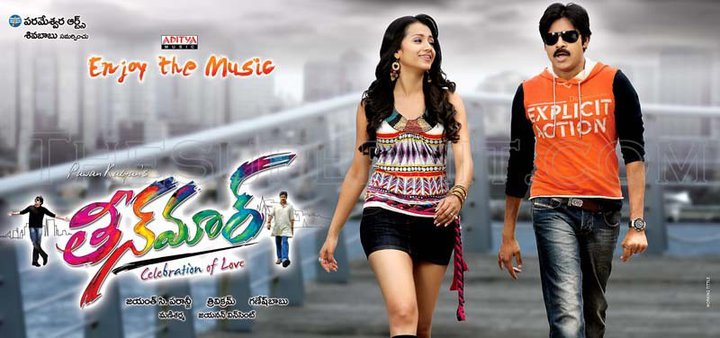
TheenMaar (2011) Original ACD RIP VBR [320Kbps]

TheenMaar (2011) Original ACD RIP VBR [320Kbps]
                  Cast : Pawan Kalyan,Trisha
     Music : Mani Sharma
  Director : Trivikram
           Producer : Ganesh Babu
                  Banner : Parameswara Arts
                                   Ripper : Nivi Entertainments (Nagesh)

First On Net

Hi Friends Ippudu Happy Eena Enjoy And Rock Ur Self

Click Below To Download All Songs

MediaFire

Click Below To Download Single Songs
Aale Bale
Singers : Hemachandra, Shravana Bhargavi
Lyricist: Bhaskar Batla
Download Link : MediaFire

Vayyarala
Singers : Karunya
Lyricist: Rahaman
Download Link : MediaFire

Chiguru Bhoniya
Singers : Viswa
Lyricist: Viswa
Download Link : MediaFire

Sri Ganga
Singers : Hemachandra, Sri Vardhini
Lyricist: Rama Jhogaya Sastry
Download Link : MediaFire

Barbi Bommaki
Singers : Benny Dayal, Shravana Bhargavi
Lyricist: Bhaskar Batla
Download Link : MediaFire

Gelupu Thalupule
Singers : Sreeram Chandra
Lyricist: Rahaman 
Download Link : MediaFire

Give Comments Thats Little Bit Happy For Us


Sunday, March 20, 2011

Pawan Kalyan's "TeenMaar" Latest pics & Latest Posters


Saturday, March 19, 2011

Mr.Perfect (2011) Original ACD RIP VBR [320Kbps]


Mr.Perfect (2011) Original ACD RIP VBR [320Kbps]
Cast : Prabhas, Kajal Aggarwal, Tapasee, Prakash Raj
Director : Dasaradh
Producer : Dil Raju
Music Director : Devi Sri Prasad
Click Below To Download All Full Songs


Click below To Download Single Songs

1.Chali Chaliga
    Artist(s): Shreya Ghoshal
Lyricist: Ananth Sriram
Download link : MediaFire

2.Ningi Jaaripadda
Artist(s): Mallikharjun
             Lyricist: Ramajogayya Sastri
Download link : MediaFire  

3.Dol Dol Dol Bhaje
                                      Artist(s): MLR. Karthikeyan, Anitha
Lyricist: Balaji
Download link : MediaFire  

4.Mora Vinara
Artist(s): Priyadarshini
    Lyricist: G. Sathyamurthy
Download link : MediaFire

5.Aakasam Badhalaina
Artist(s): Sagar, Megha
Lyricist: Ananth Sriram
Download link : MediaFire

6.Aggipulla Lanti
Artist(s): Gopika Poornima
        Lyricist: Rama Jhogaya Sastry
Download link : MediaFire

7.Badhulu Thochanai
Artist(s): Karthik, Mallikharjun
                  Lyricist: Sirivennela Seetharama Sastry
Download link : MediaFire  

8.Light Theesko
Artist(s): Baba Sehgal, Murali
 Lyricist: Rama Jhogaya Sastry
Download link : MediaFire  

9.Rao Gari Abbai
Artist(s): Tippu, Megha
Lyricist: Ananth Sriram 
Download link : MediaFire 


Tuesday, March 15, 2011

JNTU kakinada mid exam dates & Info on final exam Time tables


JNTU kakinada mid exam dates & Info on final exam  Time tables

JNTU-KAKINADA
2nd MID Exams Dates (B.Tech/B.Pharmacy)
For 2nd,3rd & 4th Years : From 28-03-2011 to 2-04-2011
Note: We Will Alert u as soon as the Time Tables are Released.
Preparation and Practical Examinations (B.Tech/B.Pharmacy)
For 2nd,3rd & 4th Years : From 4-04-2011 to 16-04-2011
End Semester Examinations (B.Tech/B.Pharmacy)
2nd ,3rd & 4th Years : From 18-04-2011 to 30-04-2011
Note: We Will Alert u as soon as the Time Tables are Released.


Saturday, March 5, 2011

Download JNTU CSE 3-2 (2010) Second Mid Online Bits

Download JNTU CSE 3-2 (2010) Second Mid Online Bits subject wise

Remaining subjects will be updated soon

CN

OOAD

OS

CD

IS
We are not responsible for any consequences.

Tuesday, March 1, 2011

Pawan Kalyan's "TeenMaar" New pics


Send the SMS from Gmail


You can now send SMS from your Gmail account directly to a mobile phone. Unfortunately, at the time of writing, it's available only for U.S. phones. SMS is actually a Gmail Labs feature and needs to be enabled before you can start using it.

Click on the Settings link (at the top right) and move to the Labs tab. You'll find "Text messaging (SMS) in Chat" (developed by Matt H. and Mark G.) way down the page so start scrolling. Select the Enable button and save the changes. Your Gmail account will load once again with the Labs feature now activated.


How do you send the SMS from Gmail?

Sending SMS from Gmail is really a simple process. Move the mouse cursor over a contact in the Chat window. Click on More (with a small blue downward arrow) and select Send SMS option. Now enter the mobile phone number. The small chat window is launched - you'll find it at the bottom right in which you type the SMS.

Please note, your contact may be charged for receiving the SMS so I suggest you don't go overboard.

SMS sent from Gmail chat will come from a 406 area code (US) number. The recipient can use this number to send a reply which gets routed back to Gmail servers to arrive at your chat window. Messages sent and received from different contacts will use different 406 numbers. However, messages from one contact will always use the same number. This means your contacts are assigned individual numbers and you can thus bookmark it in your phone.

Recipients can choose to stop receiving Gmail SMS by replying with the word BLOCK.And if you decide not to receive messages through Gmail from any of your friends, you can reply with STOP.

I hope you like this post. Please pass your comments.